One Photo, Six Shots: How This 15-Second Seedance 2.5 Film Was Made
A single reference portrait, a prompt written as six timed shots, and Seedance 2.5 at 1080p. The exact settings, the full prompt, what it cost, and the two places the result drifted from the script.
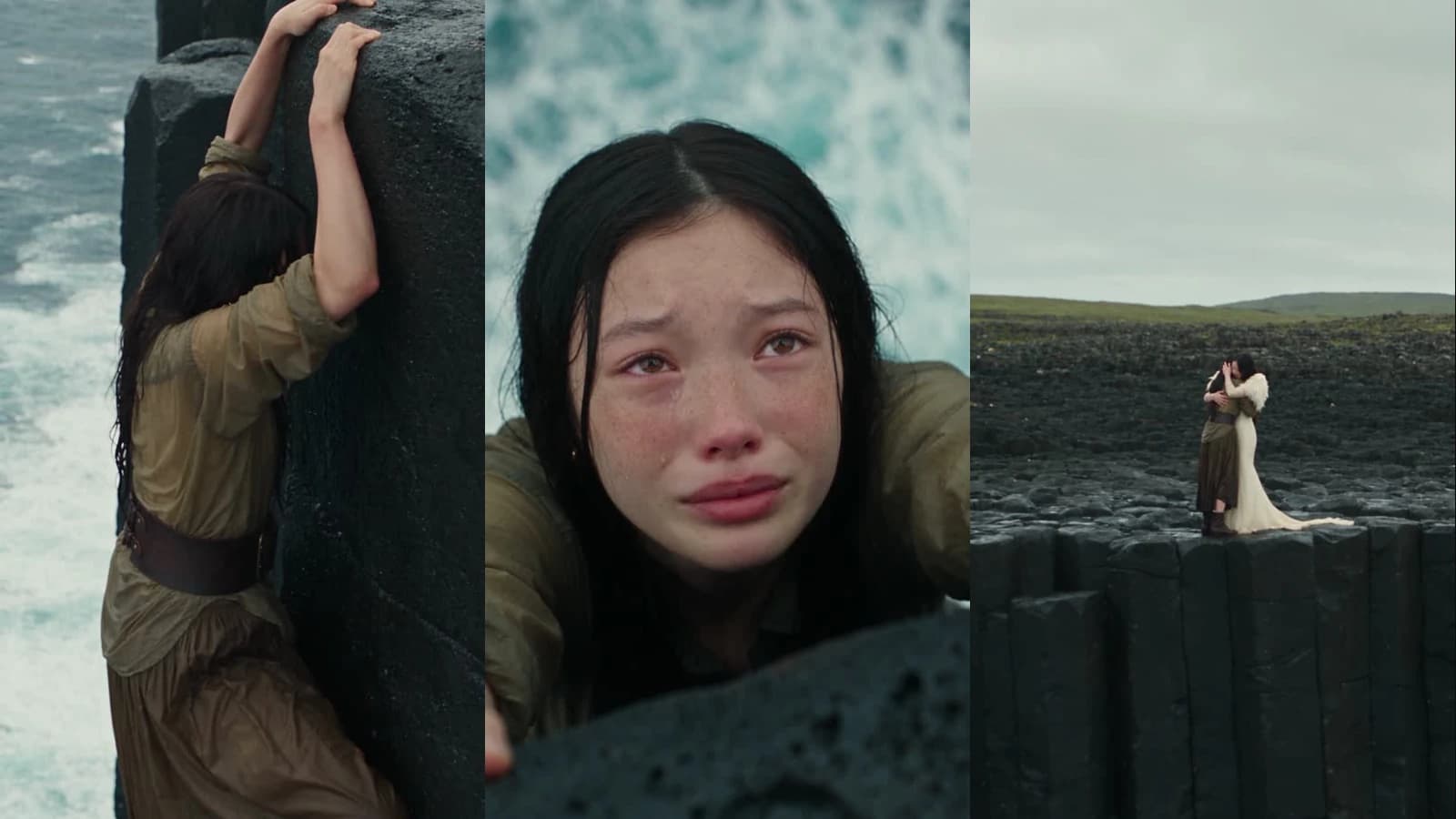
This clip is fifteen seconds of a woman rescuing a helpless version of herself from a sea cliff, and it was made from one frontal portrait and one prompt. Seedance 2.5, 9:16, 1080p, audio on, no input video, 4,950 credits. The prompt is written as six timed shots, and the model held the same face across two characters for the full fifteen seconds.
What Was Set
| Setting | Value |
|---|---|
| Model | Seedance 2.5 |
| Mode | Image reference to video, no input video |
| Resolution | 1080p (1080 × 1920) |
| Aspect ratio | 9:16 |
| Duration | 15 seconds |
| Audio | On: waves, wind, breathing, fabric |
| Reference images | 1 |
| Credits | 4,950 |
Everything else is in the prompt.
Why One Photo Is Enough
The reference is a single frontal portrait: face forward, plain background, freckles visible.

Seedance 2.5 reads identity from a reference and carries it into every character that points back to it. The prompt says so directly, use the attached model face for both women, and both the rescuer in the ivory gown and the soaked figure on the cliff come out as the same person. The freckles survive the tears, the wet hair and the wide shot.
This is the whole reason the clip works as a story. Two actors would have made it a rescue. One face makes it a woman saving herself.
How the Prompt Is Built
The prompt is long, and its length is structure rather than padding. It has four parts.
Identity, once. One line telling the model to use the reference for both characters and to keep features, skin tone and age identical.
Each character, in full, before any shot. The rescuer gets a paragraph: the gown's pleats and neckline, the feather wings, the hair, the expression. The helpless self gets another: the coarse olive blouse, the worn belt, the soaked skirt, the tangled hair, the fear. The shots that follow refer to them by role and never redescribe them.
Six shots with second ranges. 0–3 hanging, 3–5 cut to the face, 5–8 reverse angle to the rescuer, 8–10 hands, 10–13 the pull, 13–15 the embrace. Each block names the framing, the camera behaviour and the action. The 3–5 block is the most specific: cut directly from the side view to a tight, nearly frontal close-up… without a zoom, swooping camera move, orbit, or transition effect. That is a hard cut, asked for by name, and it arrived at three seconds.
Realism and an avoid list. Pores, tears, hands, wet stone, fabric movement, overcast light, and only diegetic sound. Then the things that must not happen: identity changes, hidden eyes, flying, glow, speech, text.
Shot by Shot

0–3 seconds. Medium-wide side view, both hands on the ledge, feet searching. The camera holds. She lifts her head toward the person above: the movement that motivates the cut.

3–5 seconds. The cut lands as written: frontal, slightly above eye level, ocean blurred behind. Tears, lifted brows, trembling lip. No zoom, no move.

5–8 seconds. Low angle from the hanging woman's eyeline. The same face, now composed, in the ivory gown, reaching down with a small proud smile.

8–10 seconds. Back to the tearful face as fear turns to recognition. The prompt asked for a separate close-up of the hand first; the model folded that beat into this one.

10–13 seconds. Medium side shot. The rescuer braces and pulls; the other woman gets a forearm and a knee onto the ledge. Weight and effort read as real.

13–15 seconds. A full-body wide from far back: both figures embracing on the black rock against the overcast sky, pulling slowly farther away. The clip ends there, as instructed.
Step-by-Step: Make One Yourself
Step 1: Pick one frontal reference
A clear portrait, face forward, even light, plain background. One is enough, and one is better than three, several references invite the model to average them.
Step 2: Describe each character once
Before any shot, a block per character: what they wear, in fabric-level detail, their hair, their expression, their posture. Write it as if briefing a costume department.
Step 3: Write the shots as second ranges
Divide the duration into blocks and give each a range. For each block: the framing, what the camera does, what the subject does, and how it ends. Name the cuts you want, cut directly, and name the moves you do not.
Step 4: Add the realism block and the avoid list
Skin, hands, fabric, light, sound. Then a plain list of failure modes to refuse. The avoid list in this prompt is nineteen items long, and every one of them is a thing video models actually do when not told otherwise.
Step 5: Set it and render once
9:16, 15 seconds, 1080p, audio on, reference attached, input video empty. Draft at 480p if you are unsure about the timing: it is less than a fifth of the price, then render the final at 1080p.
The Full Prompt
What It Costs
Seedance 2.5 is priced per second of output, and the rate changes with resolution. Fifteen seconds at each tier:
| Resolution | Credits per second | 15-second clip |
|---|---|---|
| 480p | 59 | 885 |
| 720p | 132 | 1,980 |
| 1080p | 330 | 4,950 |
The jump to 1080p is not linear: it is roughly two and a half times 720p, because the model is generating four times the pixels. Which is the argument for drafting cheap: a 480p pass checks the timing and the cuts for less than a fifth of the final price, and the prompt does not change between tiers.
Where It Fell Short
Two things did not arrive as written, and both are worth knowing before you copy the prompt.
The wings. The prompt asks for large, wing-shaped structures that extend outward and upward behind both shoulders. The result is feathered shoulder pieces, dense, white, and clearly part of the costume, but a cape rather than wings. The model softened the most fantastical element into something it could keep physically plausible across the pull and the embrace. If the wings matter, expect to fight for them, or accept the version the model will actually hold for fifteen seconds.
The hand close-up. The 8–10 block asks for a brief close-up of the offered hand, then a cut back to the face. The model went straight to the face. The recognition beat is there; the insert is not. Short inserts inside a two-second window are the thing this model most often drops.
One more, about the prompt itself: the version that was actually sent began with a note, the reference holds a steady side view as she raises her head… I've built that transition into the full prompt: that was written for a person, not the model. It did no visible harm, but a prompt should contain only what the model is meant to render. The version above has it removed.
Where You Still Regenerate
A timed prompt gets the structure right the first time. It does not make the render deterministic. Run this prompt again and the face will hold, the cuts will land at the same seconds, and the cliff will be a different cliff. If a specific frame matters: a particular expression, a particular composition: that is a second render, not an edit.
Try It
Press Recreate on the prompt above. Swap the reference for your own frontal portrait, keep everything else, and start at 480p.
- #Seedance2.5
- #ImageToVideo
- #AIShortFilm
- #ConsistentCharacterAIVideo
- #ReferenceImageVideoGeneration
- #TimedShotPrompt
- #9:16AIVideo
- #AIVideoPromptExample
- #Gendia
Got any questions left?
One. A single frontal portrait carried the same face, freckles included, across both characters and all six shots. Seedance 2.5 reads identity from a reference and keeps it.
4,950 credits, 330 per output second at 1080p, times fifteen seconds. The same clip at 720p is 1,980 credits and at 480p is 885. Draft at 480p, decide, then render once at 1080p.
Closely. The cut from side view to close-up landed at three seconds as written, the reverse angle at five, the wide embrace at thirteen. It is an edit list, and the model treats it as one.
Two places. The large wing structures came out as feathered shoulder pieces, and the separate hand close-up at 8–10 seconds was folded into the tearful-face beat. Both are the model softening the hardest asks, not ignoring them.
Yes. Press Recreate, swap the reference image for your own frontal portrait, and keep the rest. The costume, timing and avoid list do not depend on who is in the picture.